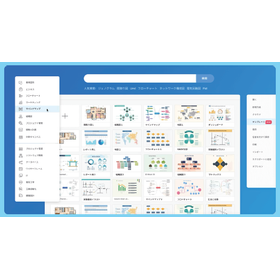
We have compiled a list of manufacturers, distributors, product information, reference prices, and rankings for Drafting software.
ipros is IPROS GMS ・ IPROS One of the largest technical database sites in Japan that collects information on.

Drafting software - List of Manufacturers, Suppliers, Companies and Products | IPROS GMS

Drafting software Product List

1~4 item / All 4 items

Displayed results

Create and edit DWG drawing data with BricsCAD Lite/Pro.

A CAD software with DWG compatibility that offers ease of use, a wealth of features, and high DWG compatibility, all at a reasonable price.

It supports the latest DWG data format and can handle drawing data created with AutoCAD and other software. The commands and menus are in a UI format familiar to AutoCAD users. You can choose between a perpetual license and a subscription license, allowing you to select a licensing model that fits your operations and budget. It is equipped with features comparable to AutoCAD, unique functions of BricsCAD, and design capabilities such as machine learning features powered by AI.

  • 2D CAD Construction
  • 2D CAD machine
  • 3D CAD
  • Drafting software

Added to bookmarks

Bookmarks list

Bookmark has been removed

Bookmarks list

You can't add any more bookmarks

By registering as a member, you can increase the number of bookmarks you can save and organize them with labels.

Free membership registration

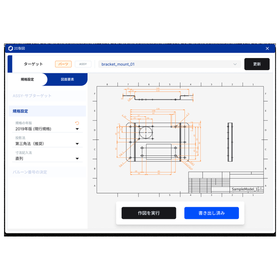
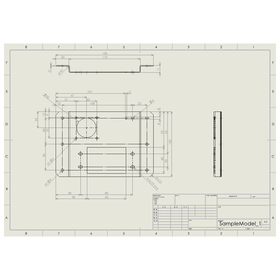
Hacadly Automated 2D Drafting - 2D drawings generated automatically from 3D models

Generate views, dimensions, annotations and the title block automatically from a 3D model. Drawing release in minutes.

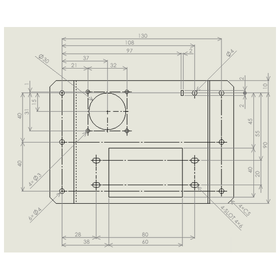
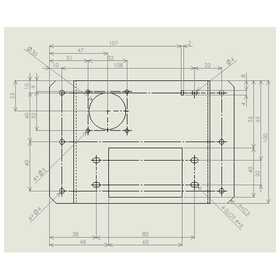
Hacadly Automated 2D Drafting generates 2D drawings complete with views, dimensions, tolerances, annotations and a title block - from a 3D model plus a few supplementary inputs. Dimensions are narrowed down to the set the drawing actually needs, and their placement is arranged automatically so that dimension lines do not overlap. Repeated features are grouped into a single callout such as "4 x Ø4", and detail views and the sheet size are chosen automatically to suit the part. You can choose where dimensions originate: from the outline (left and bottom edges), or from the centre of a hole you select. The same 3D model can therefore be drawn to match your own drafting standards. [Typical challenges] - Releasing 2D drawings after the 3D model is finished takes too long - Every design change means redoing the 2D drawings - Transcription errors in dimensions and annotations drive checking load and rework

  • Company:WOGO
  • Price:Other
  • sub1_規格設定.png
  • sub2_面基準で出力した図面.png
  • sub3_穴基準の寸法.png
  • sub4_面基準の寸法.png
  • 3D CAD
  • 2D CAD machine
  • Drafting software

Added to bookmarks

Bookmarks list

Bookmark has been removed

Bookmarks list

You can't add any more bookmarks

By registering as a member, you can increase the number of bookmarks you can save and organize them with labels.

Free membership registration

EdrawMax: A diagramming and drafting software for organizing and sharing complex tasks visually.

Introducing a high-performance and cost-effective alternative solution to Microsoft Visio!

This document is an introduction that summarizes the features and case studies of the chart creation tool "EdrawMax," which specializes in visualizing specialized information. As benefits for corporations, it explains high cost performance, support for various file formats, flexible cross-platform licensing, and security and compliance. It also includes usage scenarios by job type and industry, as well as pricing plans, which can be used as reference material when considering implementation. 【Contents (partial)】 ■About Wondershare ■Introduction to EdrawMax ■Reasons for choosing EdrawMax ■New features in V15 ■Product highlights *For more details, please download the PDF or feel free to contact us.

  • Other information systems
  • Drafting software

Added to bookmarks

Bookmarks list

Bookmark has been removed

Bookmarks list

You can't add any more bookmarks

By registering as a member, you can increase the number of bookmarks you can save and organize them with labels.

Free membership registration

Drawing and drafting software 'EdrawMax'

Powerful and versatile! Equipped with over 280 types of multifunctional diagram templates.

"EdrawMax" is an all-in-one drawing software specialized for diagramming and drafting tasks. You can easily create over 280 types of diagrams, including flowcharts, mind maps, organizational charts, circuit diagrams, and floor plans. It comes equipped with templates designed for various industries and over 50,000 shapes. You can export to various formats such as PDF, Office (Word, Excel, PPT), SVG, and images (JPG/PNG) with just one click. 【Features】 ■ Create over 280 types of multifunctional diagrams ■ Intuitive operation for easy diagram creation by anyone ■ Abundant templates and shape library ■ Support for export to multiple formats *For more details, please download the PDF or feel free to contact us.

  • Other information systems
  • Drafting software

Added to bookmarks

Bookmarks list

Bookmark has been removed

Bookmarks list

You can't add any more bookmarks

By registering as a member, you can increase the number of bookmarks you can save and organize them with labels.

Free membership registration